
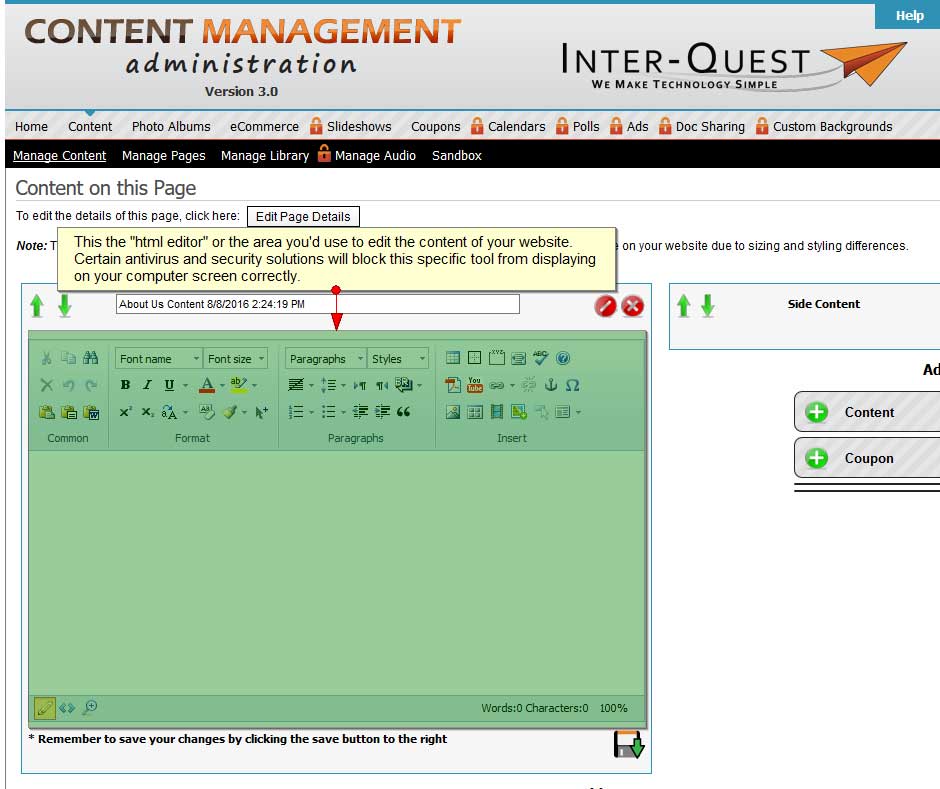
I can't access the html editor.
(the area used for editing my website pages' content)
Certain antivirus and security solutions (e.g. Kaspersky, Norton, or AVG) can block the ability to update the content through the html editor.
What's an html editor? The html editor is the tool you use to edit the content on each of your website pages.
The problem is described as trying to click on the "Edit" icon and nothing happens. Or, after clicking on the "Edit" button,
there's a blue loading circle that appears in the middle of the html editor and never goes away.
*Some Clients who have not experienced issues in the past with editing their websites can also be affected after they've received security updates on their computer.
Recommended Fix:
Please try refreshing your computer screen. Below are images of the tool bars for the Chrome, Internet Explorer, Microsoft Edge, and Firefox browsers, and where you can access
the "Refresh" button. Please press the "Refresh" button.
Microsoft Edge

Firefox

Chrome

Internet-Explorer

I could still use additional help.
Please fill out the form below.
Items in bold are required.