
How do I change who receives the submitted contact forms?
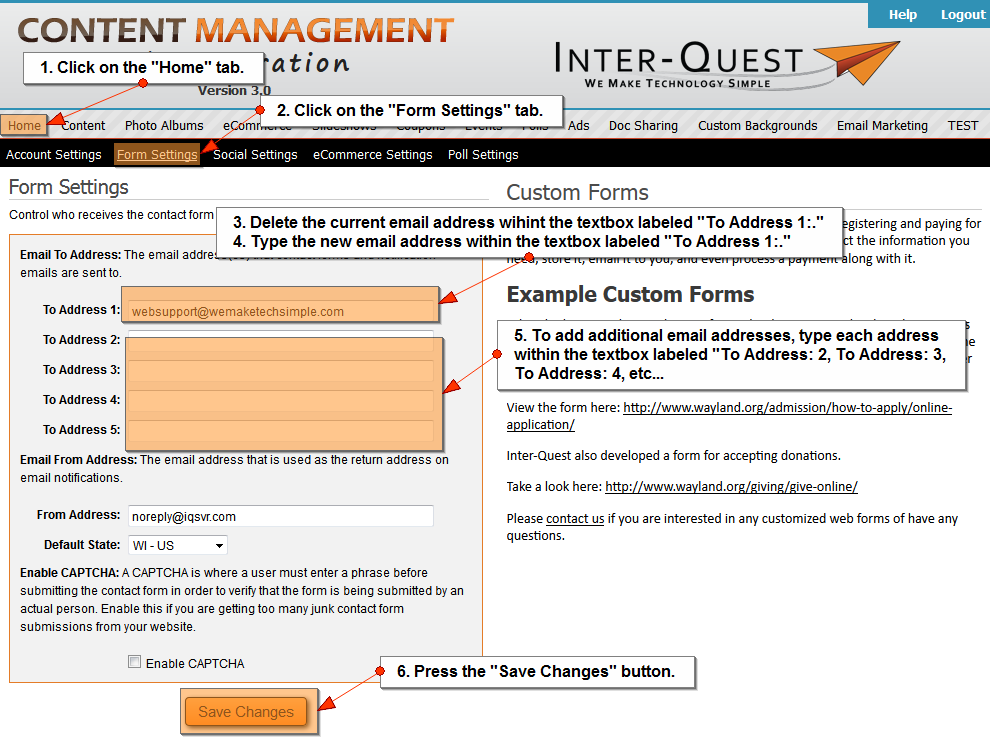
- Click on the "Home" tab.
- Click on the "Form Settings" tab.
- Delete the current email address within the textbox labeled "To Address 1:."
- Type the new email address within the textbox labeled "To Address 1:."
- More than one email address can receive submitted contact forms. To add additional email addresses, type each address within the textbox labeled "To Address 2:, To Address 3:, To Address: 4:, etc..."*Up to 5 additional email addresses may be added.
- Press the "Save Changes" button.
Related Topics:
I could still use additional help.
Please fill out the form below.
Items in bold are required.